Analogue audio
PLAYER → RCA / JACK → LINE INPUTA low level music signal goes from a CD player, portable player or other source to an amplifier's line input.

RCA, Toslink, HDMI, SCART, speaker wire. Cable labels can look like a foreign language when you are building your first system. This visual guide explains what each connection carries, what it plugs into and what to check before you buy.
Before looking at plugs, decide what the cable must carry. A small audio signal, digital sound or picture, and amplified speaker power each need the right connection.
A low level music signal goes from a CD player, portable player or other source to an amplifier's line input.
The source sends digital data. The receiver or TV must have a matching input, and support the audio or video format being sent.
The amplifier's speaker outputs send power to passive speakers. This is a different connection from RCA or a headphone jack.
Look for red and white or red and black sockets labelled AUDIO OUT, LINE OUT, AUX, CD, TAPE or LINE IN.
A standard stereo RCA lead has two separate cables. White, or sometimes black, is the left channel. Red is the right channel. Connect a source's AUDIO OUT to an amplifier's matching LINE IN or AUX IN, then select that input on the amplifier.
RCA carries analogue line-level sound between components. It does not carry speaker power. A turntable usually needs a PHONO input or an external phono preamplifier before its signal can go into a regular AUX input.
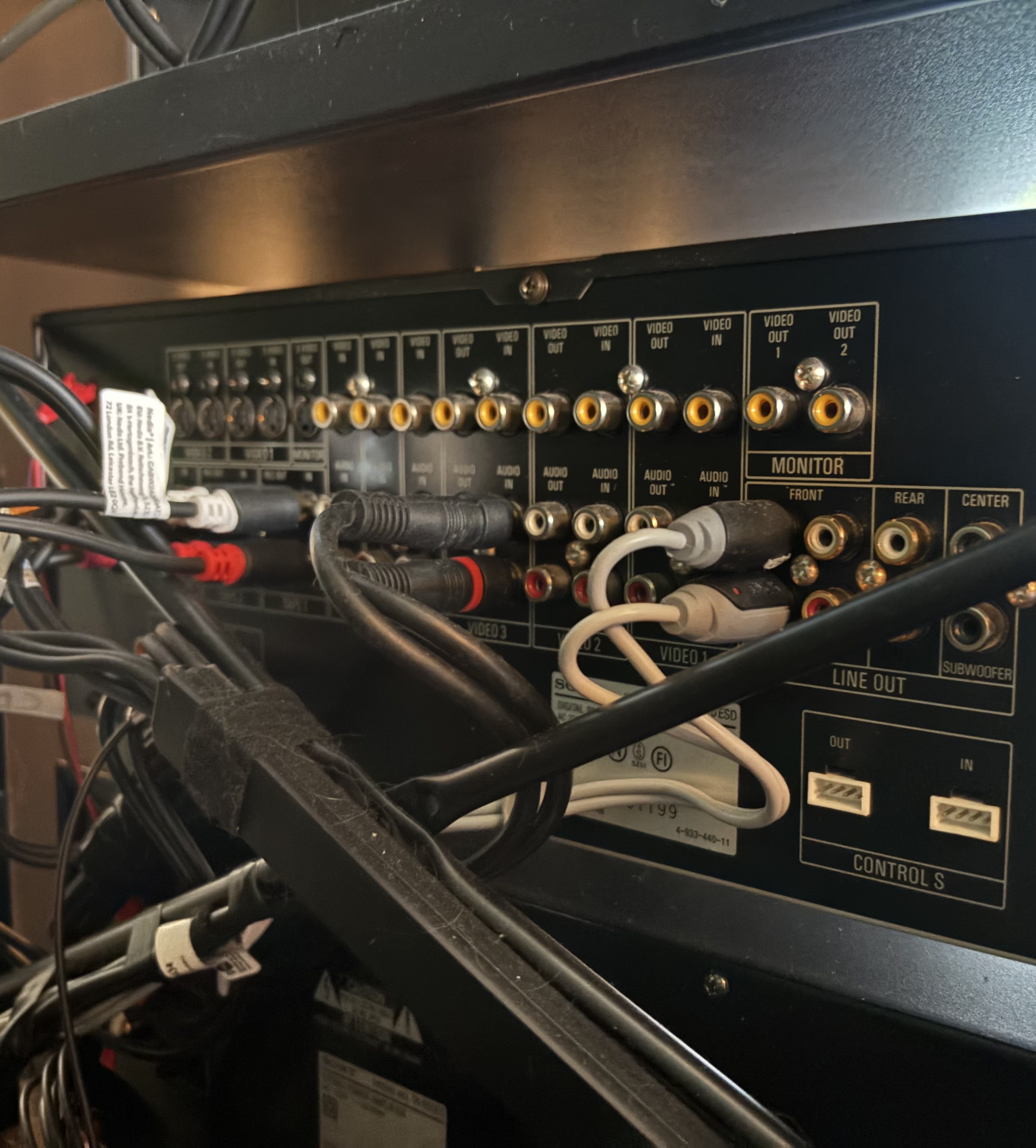
The receiver pictured has RCA line outputs labelled for front, rear, centre and subwoofer channels. These send a low-level signal to a separate power amplifier or powered subwoofer. They do not drive passive speakers. Passive speakers use the receiver's separate speaker terminals.
Usually red and white, two analogue channels for stereo sound.
One RCA-style plug carries digital S/PDIF audio when both devices have a COAXIAL DIGITAL socket.
Both can send digital audio from a television, CD player or other source to a compatible amplifier. Match the output and input labels at both ends.
A Toslink cable sends digital audio as light. It does not carry video and it does not make the amplifier's audio processing automatic. Connect DIGITAL OPTICAL OUT to an optical input, remove the small protective caps and select the matching input.
For a television, PCM stereo is often the simplest setting for a stereo amplifier. Some equipment also supports certain compressed surround formats. The source and receiver must agree. Check both manuals if you hear silence or noise.
A digital coaxial connection usually looks like one RCA socket labelled COAXIAL, COAX or DIGITAL IN. Use one 75-ohm coaxial cable, not the red and white pair used for analogue stereo.
The familiar RCA-shaped plug does not tell you whether the socket carries analogue or digital sound. Read the label at both ends. A compatible digital input can convert the incoming digital signal to sound using its own DAC.
Video connections often carry sound as well. Older analogue equipment and modern digital equipment use different standards, so a plug adapter alone may not convert the signal.
HDMI can carry digital picture and sound over one cable, for example from a Blu-ray player to an AV receiver and then to a television. It can also connect a player directly to the TV.
To return TV sound to a receiver, connect the sockets marked HDMI ARC or eARC at both ends. The equipment and settings must support the feature. Buy a cable certified for the resolution, refresh rate and features you actually need, not a costly cable with vague promises.
SCART, also called Euroconnector or Péritel, was common on European televisions, DVD players and VHS recorders. One wide plug can carry analogue stereo audio and video. Depending on the equipment and cable, video may be composite or higher-quality RGB.
SCART is not HDMI and does not carry a digital signal. If you need to connect SCART equipment to a modern HDMI-only television, use a suitable active converter and check which direction it converts.
A MiniDisc player, Walkman, portable CD player or other device with an analogue headphone or line output can play through a home amplifier.
Plug the small stereo jack into the player's HEADPHONE or LINE OUT socket. Connect the red and white RCA ends to a LINE IN, AUX IN, TAPE IN or REC IN on the stereo. Select that input and start with both volumes low.
Some portable players have a fixed-level line output. Others use a volume-controlled headphone output. If the sound is too quiet or distorted, adjust the portable player's volume gradually. Check the player manual for the right output.
This is an analogue connection, so no Wi-Fi, mobile data or special app is needed. The music comes from the disc or tape in the portable player.
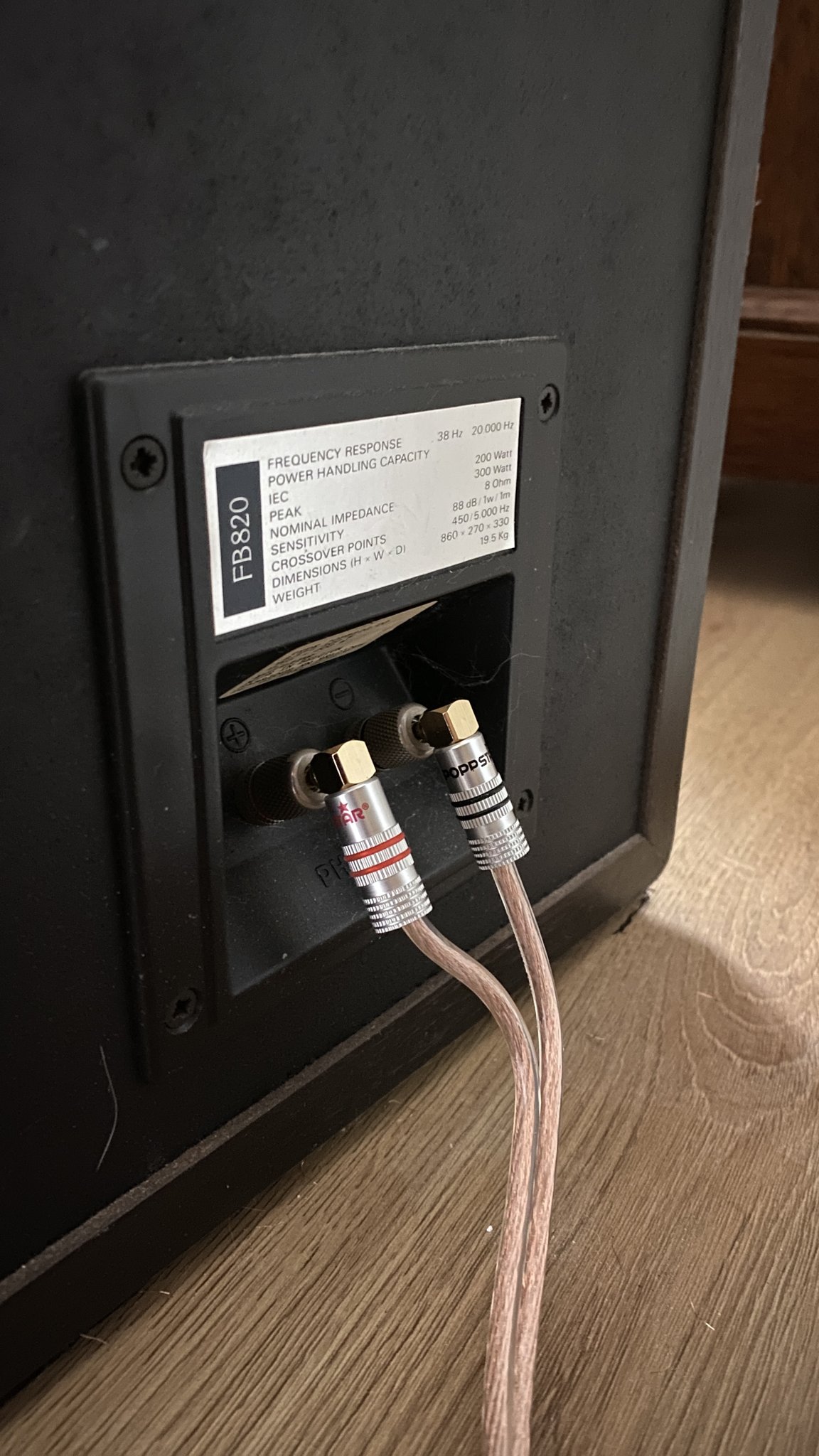
Each passive speaker needs two conductors from an amplifier's speaker terminals. Keep the positive and negative sides matched at both ends.
Speaker cable is usually a pair of insulated copper conductors. One goes from the amplifier's red or positive terminal to the speaker's red or positive terminal. The other runs from black or negative to black or negative.
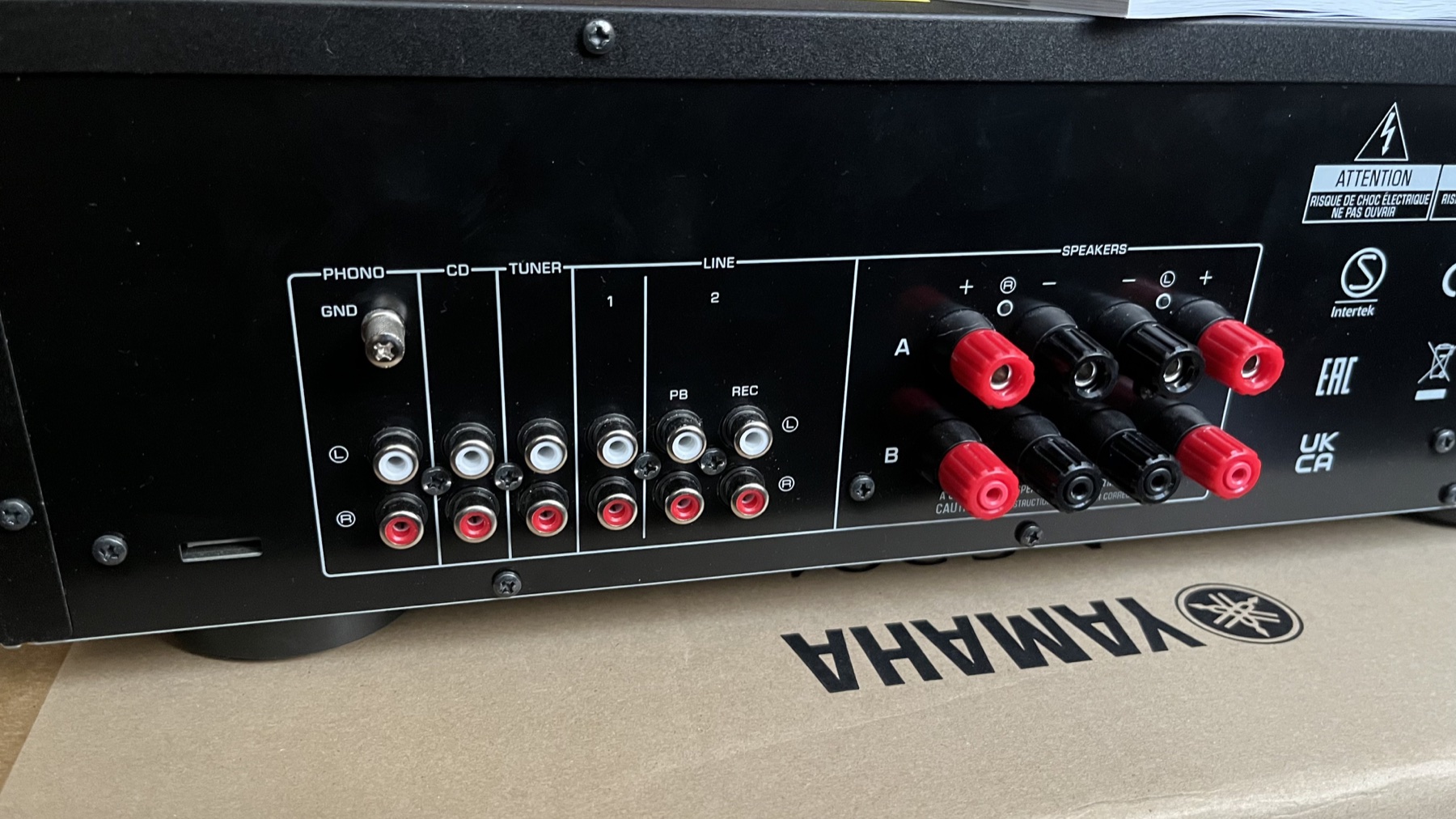
The photo shows the distinction on a real amplifier: line-level RCA inputs accept sources such as a CD player, while the speaker terminals send amplified power to passive speakers.
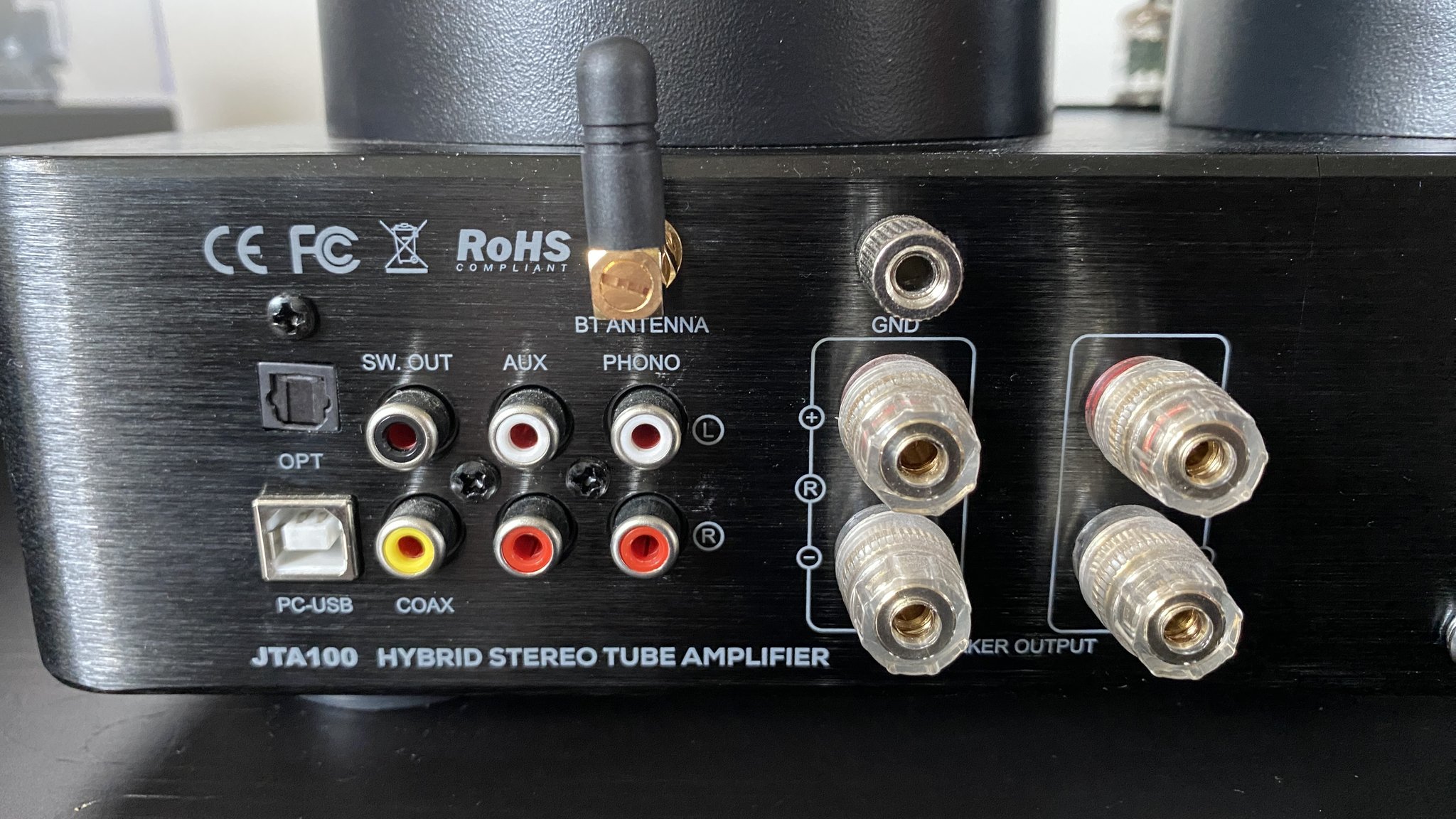
This rear panel brings together familiar RCA inputs such as AUX and PHONO, plus digital connections including coaxial, optical and USB. It also has speaker terminals for passive speakers.
Match the source output to the amplifier input. A turntable may connect to PHONO if the input suits its cartridge, while a CD player can use an analogue line input or a compatible digital input. The exact options vary by model.
| One-way cable run to each speaker | Practical metric starting point | Approximate US gauge (AWG) | What to check |
|---|---|---|---|
| Up to about 5 m | 1.5 mm² or 2.5 mm² copper | About 15 AWG or 13 AWG | For many ordinary home systems, this is a sensible short-room run. Choose the larger size if your speakers are low impedance or the wire is routed tightly. |
| About 5 to 10 m | 2.5 mm² copper | About 13 AWG | A thicker conductor helps keep resistance down as the cable gets longer. |
| Longer than 10 m | Consider 2.5 to 4 mm² | About 13 to 11 AWG | Speaker impedance, amplifier power and installation matter. Check the amplifier or speaker maker's guidance for the actual run. |
AWG means American Wire Gauge. The equivalents above are approximate nearest sizes, since metric cross-sections and AWG sizes do not match exactly. For reference, 16 AWG is about 1.31 mm², 14 AWG about 2.08 mm², 12 AWG about 3.31 mm² and 10 AWG about 5.26 mm². These are beginner-friendly starting points, not a universal engineering limit. Length means the one-way distance from amplifier to speaker. Cable resistance is in the full out-and-back circuit, and lower-impedance speakers make that resistance more significant. Belden / Alpha Wire's AWG conversion chart.
These KEF Q700 photos show a speaker with two pairs of binding posts and speaker cable terminated with banana plugs. The upper and lower pairs connect to different sections of the speaker's crossover when the speaker is configured for bi-wiring. Banana plugs make a neat, secure connection to compatible binding posts, but ordinary bare wire can work just as well.
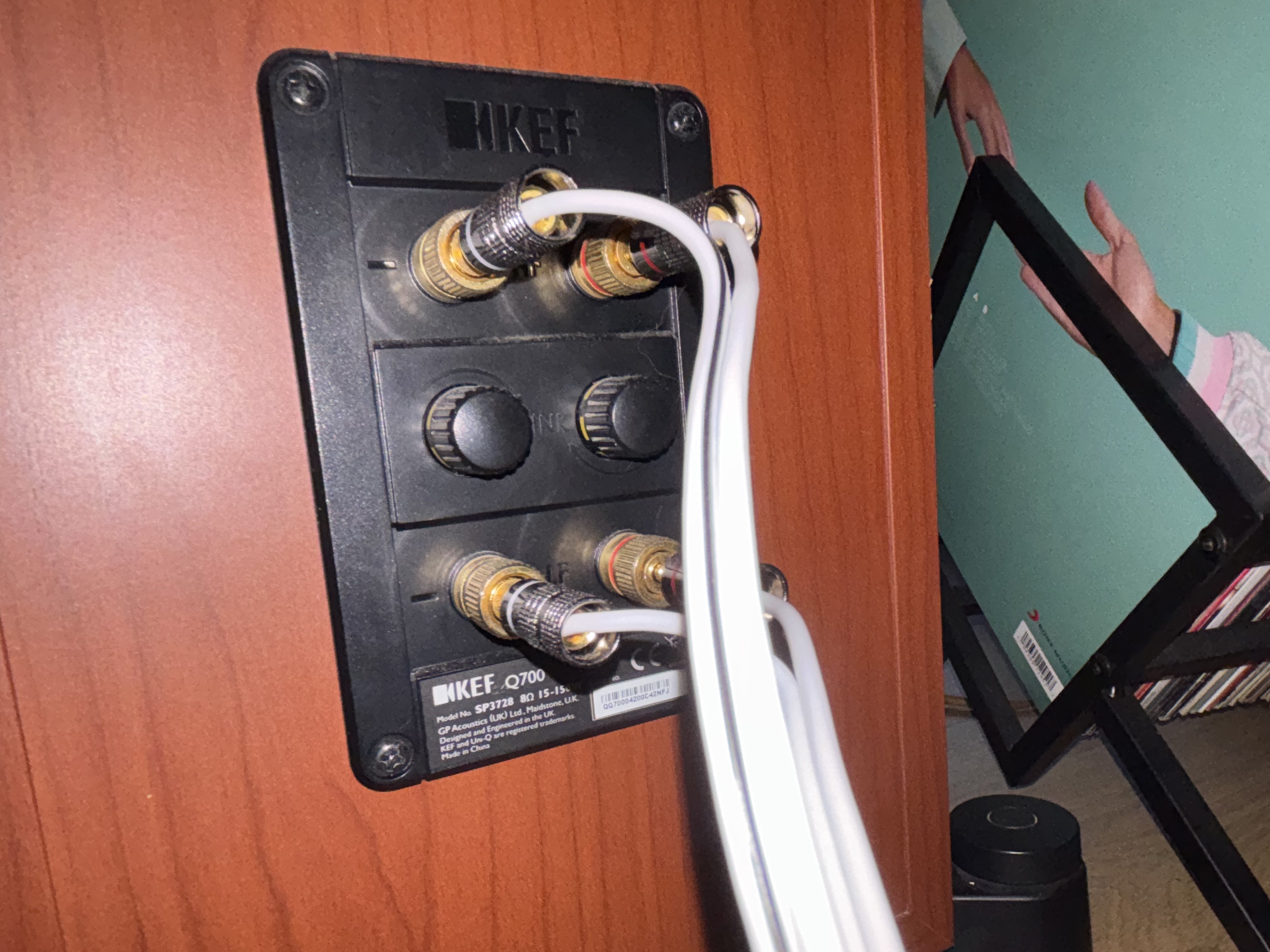
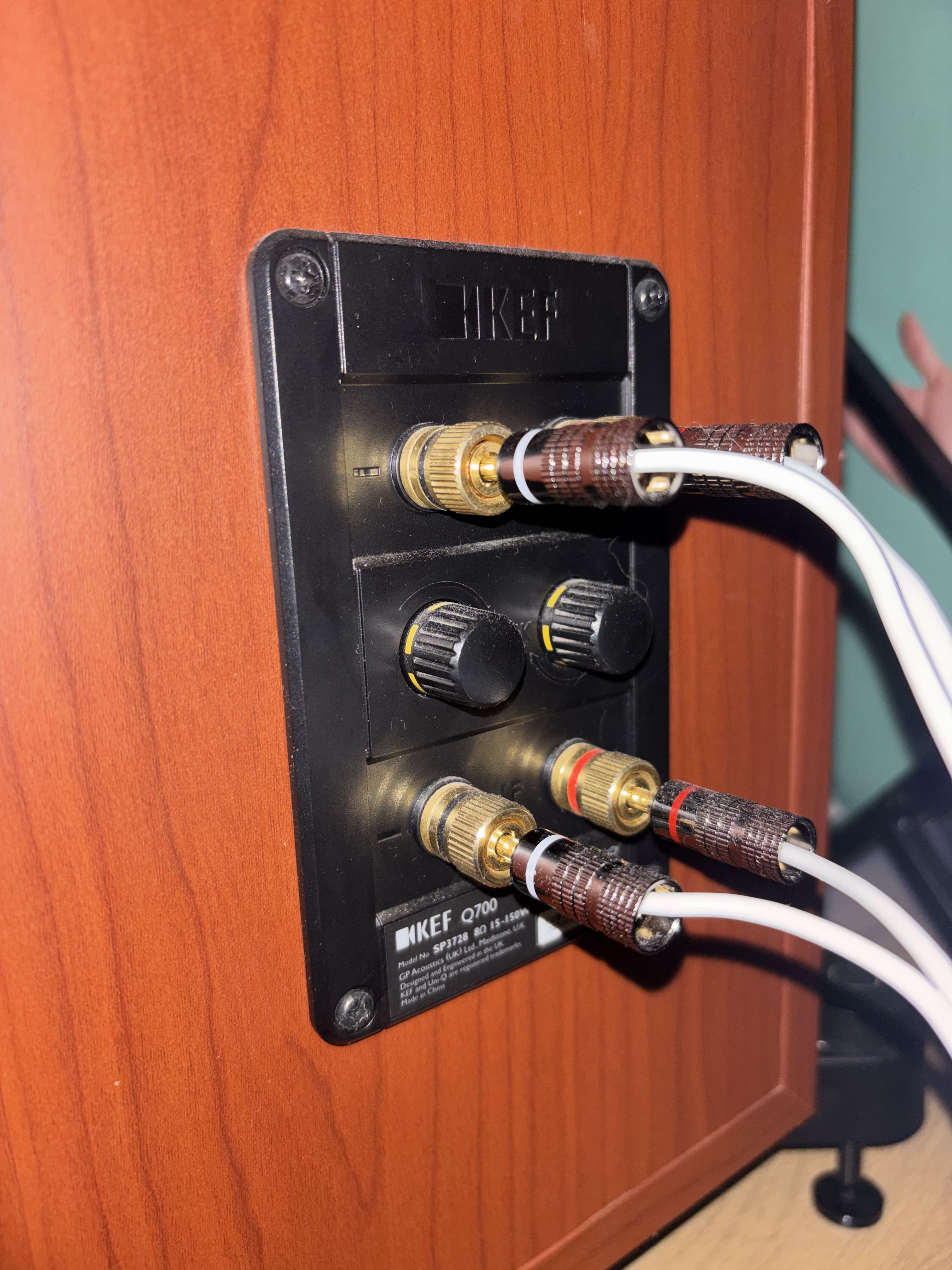
Keep it simple if you are starting out. Use the speaker's normal single-wire setup unless you have a compatible amplifier and a clear reason to bi-wire. With the amplifier switched off, follow the speaker manual exactly. Leave the terminal links fitted for single wiring, and remove them only when the manual calls for it. Never connect two amplifier outputs to one speaker terminal pair. Bi-wiring is different from bi-amping, and does not guarantee an audible improvement.
Strip only enough insulation to fit the terminal. Twist the strands together, insert them fully, then tighten the post or clamp. Check no loose strands can touch the other pole.
A banana plug makes plugging into a compatible binding post quick and tidy. Confirm the amplifier accepts banana plugs, and remove any terminal plugs or safety caps only as the manual allows.
The fork sits around a compatible binding post and is clamped by its collar. Match the fork width to the terminal. Do not force a plug that does not fit securely.
Good cable is useful. Cable marketing can make simple decisions sound mysterious, but length, conductor and safe connections do most of the practical work.
OFC means oxygen-free copper. It describes a copper purity grade used in some cables. It can be well made, but the letters do not automatically make a cable sound better than another correctly sized copper cable in a normal home system.
Choose a genuine copper conductor with enough cross-section for the distance, a durable jacket and terminals that make a secure contact. Avoid paying a large premium for claims that cannot be tied to a real installation need.
Very thin conductors have more electrical resistance. Over a long run, that wastes some amplifier output as heat and can slightly change what reaches the speaker. Copper-clad aluminium cable also has more resistance than copper of the same size, so when using it, choose a larger conductor to compensate.
A sensible, well-made copper cable is enough for most systems. A super-thick cable is awkward to route and may not fit the terminals. There is no prize for choosing the biggest one.
Most connection problems come from using the wrong input, expecting one cable to do several jobs, or confusing a line signal with speaker power.
Look at the source device. Is the socket labelled LINE OUT, AUDIO OUT, OPTICAL, COAXIAL, HDMI or HEADPHONE?
Check the receiving device has the same type of input. A plug that fits does not prove the signal type is right.
RCA line cable is not speaker cable. Toslink is audio only. HDMI carries digital video and audio. SCART is older analogue AV.
Turn equipment off for speaker wiring, check polarity and input selection, then power up and raise the volume gradually.
If a sound or picture does not appear, start by checking the device labels and settings at both ends.
A short RCA lead may work in some setups, because the connector fits. A cable made for 75-ohm digital coax is the right choice for a coaxial S/PDIF connection. Check that both sockets are labelled for digital coax.
No. RCA carries a low-level audio signal between source and amplifier. Passive speakers connect to the amplifier's speaker terminals using two-conductor speaker wire. Powered speakers may accept RCA or another line-level input.
Yes, if the player has a headphone or line output and the stereo has an AUX, LINE IN, TAPE IN or equivalent input. Use a compatible cable, often 3.5 mm stereo jack to two RCA plugs, then select that input.
If the car stereo has a working AUX input, connect the player's headphone or line output to it with the matching audio cable. A 3.5 mm AUX socket usually uses a 3.5 mm stereo cable at both ends. Check the car stereo manual, start with the volume down and keep the player secured while driving.
No. Choose the right conductor size for your speaker and cable run, use safe insulation and make secure connections. More expensive or thicker cable is not automatically better for every setup.
Ports and supported formats vary. These primary references show why the labels and manuals matter.
Equipment makers can use the same socket shape for different functions. Always confirm the input and output labels in the manual for the exact model.